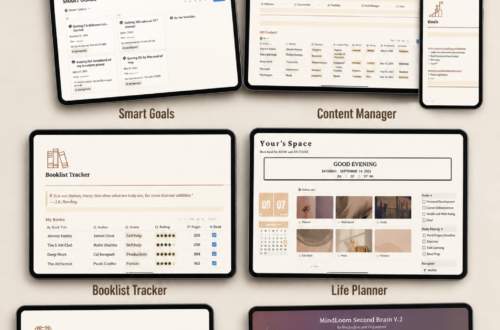
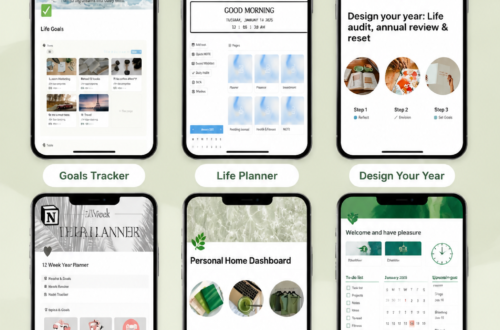
Most habit apps ask for a subscription, keep your data locked inside their own walls, and reduce your routines to a single streak number. A notion habit tracker works differently. You own the database, it lives next to your tasks, goals, and notes, and it opens on your computer, phone, and iPad.

This guide covers two things. First, you will learn how to build a habit tracker in Notion from a blank page, step by step. Second, you will see seven ready-made templates grouped by what they do best, so you can duplicate one and start the same day. Every template here is a digital Notion template. You copy it into your own workspace, and a free Notion account is enough for the basic setup.
Creative Fabrica currently offers one month of free access under its promotion terms, which gives you time to test a few layouts before you commit. Read the current terms before you sign up, because promotions change, and do not expect every template to stay free after the trial.
What Is a Notion Habit Tracker and Why Use One
A notion habit tracker is a page or database where each habit is a row and each day, week, or month is a column or entry. You mark completion with a checkbox, a formula, or a chart, and the numbers update as you go. The concept is simple. The real advantage comes from how easily it connects to everything else you already do in Notion.
Single-purpose apps are good at one job: tracking habits. Notion lets you link a habit to a project, a weekly review page, or a reading list. If your running habit supports a fitness goal, you can see both on the same dashboard. That connection is the main reason people choose a habit tracker on Notion instead of a standalone app.
The trade-off is that Notion is less gamified. You will not get confetti animations or push reminders out of the box. If you need strong motivation from notifications, you can pair your Notion page with phone reminders, which is what many users do.
Who benefits most? Students who juggle deadlines and study routines, freelancers who want health and work habits in one place, people managing ADHD who need a calm and predictable layout, and creatives building a daily practice. A good habit tracker turns vague intentions into a visible record you can review every week.
Notion Template Habit Tracker Picks for Every Routine
Below are seven options, ordered from the most focused tracker to the broadest life system. Every notion template habit tracker in this list is a digital copy you duplicate into your own workspace. Each entry lists what the template is best for and what is inside. The descriptions reflect what the listings state, so check the product page for the latest details before you buy.
1. Progress Charts and Success Rate Board
Best for: visual progress and accountability.
Up to ten daily habit checkboxes on one page, so the whole routine fits in view.
An automatic success rate that updates as you tick items off.
Progress charts that show completion trends over time, so weak spots stand out.
A habit list you can edit whenever your goals change.
This is a strong pick if you want a clear tracker without extra sections, and it gives beginners a gentle start with a notion habit tracker.
Progress Charts For Daily Wins

A habit tracker built around progress. Mark up to ten daily habits with checkboxes, watch the success rate update on its own, and follow your completion trends on visual charts. Adjust the habit list whenever your goals shift.
2. Soft Pink Routine Tracker
Best for: a soft, pink, aesthetic-first setup.
A coquette-style pink palette with a feminine visual theme.
An organized tracking view for daily habits that stays easy to scan.
Simple color changes if you prefer a different mood.
If you are looking for a notion habit tracker aesthetic that feels personal, this layout leads the pack.
Soft Pink Routine Tracker Layout

A soft, pink-themed tracker that blends the coquette look with a practical routine view. Log your habits in one calm space and personalize the palette to match your style.
3. Minimal Life Dashboard With Habit Section
Best for: minimalists who want habits inside a full life dashboard.
A habit tracker section alongside a quick to-do list.
A weekly task planner and a vision board area.
Progress bars, academic planning, a bookmark manager, and a digital flip clock.
Keep in mind this is a full system. The habit tracker is one section among several, so it suits people who want everything in one calm space.
Calm Minimal Life Dashboard

A quiet, all-in-one life dashboard with a habit tracker next to tasks, weekly planning, goals, academic planning, and a bookmark manager. Its minimal look includes a digital flip clock and progress bars.
4. Notion Life Dashboard For Habits, Tasks, and Notes
Best for: one dashboard for habits, tasks, notes, and projects.
Habit tracking with progress bars for each routine.
A task manager that groups to-dos by project or deadline.
Monthly progress charts that show how consistent you have been.
A notes area for meeting notes and ideas.
The listing says it works with the free Notion plan, which makes it a good test for beginners. Confirm this on the page before you duplicate it.
Clean Dashboard for Daily Routines

A single dashboard for habits, tasks, notes, and projects, with progress bars, deadline-based task views, and monthly charts that show how steady your routines are. The listing states it works on the free Notion plan.
5. ADHD-Friendly Planner With a Habit Log
Best for: ADHD-friendly planning with a calm, low-distraction design.
A habit tracker alongside a daily planner and to-do lists.
A sleep log and a mood questionnaire for spotting patterns.
Budget, fitness, and nutrition pages linked by a navigation bar.
Several planner views, from yearly and monthly down to weekly and daily.
If you want a notion habit tracker that stays calm and predictable, begin with the habit page and leave the other sections closed until you need them.
ADHD-Friendly Daily Planning Pages
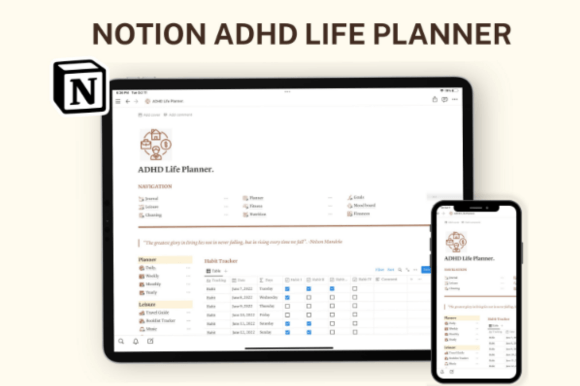
An ADHD-friendly planner designed for distraction-free routines. Alongside a habit tracker you get daily and weekly planners, to-do lists, a sleep log, and budget and fitness pages, all connected through one navigation bar.
6. Creative Routine Planner For Artists
Best for: illustrators, artists, and creative hobbyists tracking daily practice.
A creative habit tracker for daily sketching and making.
A monthly sketching challenge and an inspiration section.
A project tracker and a skill learning log.
A short video walkthrough that explains how the planner works.
If drawing every day is your habit, this layout keeps practice visible without cluttering your working pages.
Creative Routine and Sketch Planner
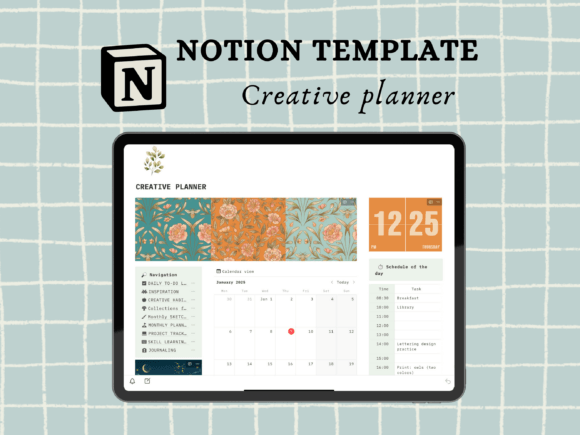
A creative planner for illustrators and artists. It combines a monthly sketching challenge, inspiration pages, a creative habit tracker, project tracking, and a skill learning log, plus a short video tour.
7. Full Bundle With Habit Tracker and Daily Planner
Best for: buyers who want many templates in a single purchase.
A daily planner and a habit tracker included in one package.
Project, task, finance, CRM, and freelancer templates for broader use.
A plug-and-play setup with lifetime access, according to the listing.
The bundle includes a notion habit tracker along with many other pages. Check the current price on the listing before you buy, since bundle pricing changes.
A large bundle of Notion templates with a habit tracker and daily planner, plus project, finance, CRM, and life-system options. Plug-and-play setup with lifetime access. Check the current price on the listing.
Formula Guides for Building Your Own Streak Logic
Two learning guides in the catalog focus on Notion formulas rather than ready-made layouts. They are useful if you want to build streak counts, completion rates, or progress bars yourself. Treat them as study companions, not as templates. If you want to build your own notion habit tracker logic, these are the right place to start.
Formula Lessons That Power Streaks
Best for: learning the logic behind streaks and progress bars.
Step-by-step lessons from formula basics to conditional logic.
Practice exercises for building habit tracker formulas.
Examples for progress bars and priority tags.
Formula Lessons For Streak Logic
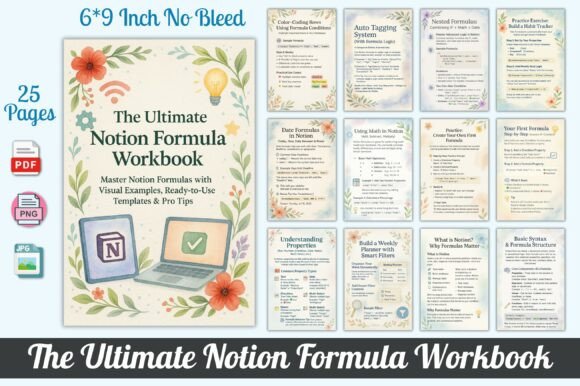
A learning guide for building your own Notion formulas, from the basics to the logic behind habit streaks, progress bars, and priority tags. Work through clear examples and practice exercises at your own pace.
Formula Reference for Completion Rates
Best for: calculating completion rates, weekly progress, and monthly reviews.
Formula patterns for habit completion, streaks, and weekly totals.
Conditional formatting ideas and dashboard examples.
A troubleshooting section for common formula errors.
Formula Reference For Habit Data

A formula reference for habit trackers and dashboards. Learn to calculate completion rates, streaks, and weekly and monthly progress, then apply conditional formatting and fix common errors.
How to Get Access and Duplicate a Template
Creative Fabrica currently offers one month of free access under its promotion terms. Use that window to test a few templates. Once the trial ends, check each listing for its price. Do not treat the trial as permanent free access, and do not assume every item stays free.
Access Through the Free Month
Create or sign in to your Creative Fabrica account, open the product page you want, and follow the offer steps shown there. The exact steps can change, so read the on-screen instructions carefully before you click anything.
Duplicating a Template in Four Steps
Open the product page and get the template by following the product instructions.
Open the Notion link included with the download in your browser or app.
Click Duplicate from the top-right menu and choose the workspace where you want it.
Customize the copy: rename habits, change colors, and delete sections you do not need.
How to Set Up a Notion Habit Tracker From Scratch
If you prefer building your own system, you can create a working notion habit tracker in under an hour. The steps below use two linked databases, which keeps your data clean and makes charts easier to build.
Choose Your Tracking Unit
Decide whether you want daily checkboxes, a weekly grid, or a monthly view. Daily tracking gives the fastest feedback, while weekly tracking is more forgiving on busy schedules. Most people start daily, then add a monthly review once the habit feels automatic.
Build the Habits Database
Create a database called Habits with these properties: Habit (title), Category (select), Frequency (select), Start date (date), Goal (number), and Active (checkbox). This database is the core of your notion habit tracker, so keep the list short. Five to seven active habits is plenty for most people.
Create a Daily Log Database
Create a second database called Daily Log with Date (date), Habit (relation to the Habits database), Done (checkbox), Mood (select), and Notes (text). Each row represents one habit on one day. Relations let you show completions beside each habit without retyping anything.
Add Progress Formulas
A formula is what turns a notion habit tracker into a real dashboard. Add a formula property to the Habits database that divides completed days by days since the start date to get a completion rate. Keep formulas short, test them with a few sample rows, and check them again after you duplicate a template, because small edits can break them.
Build a Monthly View
Create a board or calendar view grouped by habit, then add a filter for the current month. Save it as a separate view so you can switch between this month and the full history. This turns your log into a quick review screen.
Notion Habit Tracker Ideas and Notion Habit Tracker Aesthetic Styles
These notion habit tracker ideas help you style a tracker without wasting hours. A pretty layout does not replace a working system, but it does make you open your page more often.
Minimal Black-and-White Layout
Use one or two neutral colors, plain icons, and a single accent color for completed habits. It reduces visual noise, which helps when you want to focus on the routine itself.
Pastel Color Coding by Category
Assign a color to each category, such as green for health, blue for study, and yellow for money. The colors let you scan quickly and notice which areas are being neglected.
Covers and Icons for Each Habit
Add a cover image and an icon to each habit page. Use free icon sets or your own images, and check the license before you use them in a shared or commercial workspace.
Habit Ideas Worth Tracking
Start with habits that have a clear trigger and a short action. Good examples include drinking a glass of water after breakfast, reading ten pages before bed, a 20-minute workout, a consistent sleep time, and one focused study session each day.
Daily or Monthly: Choosing a Notion Daily Habit Tracker Layout
Your layout should match the stage you are in. The daily version is for building a habit, and the monthly version is for reviewing it.
The Daily Check-In
A daily tracker works like a checklist. Open it, tick the habits, and close the page. Keep it fast. If the check-in takes more than a minute, you will skip it on busy days.
The Monthly Overview
A monthly habit tracker notion layout works like a heatmap. Each habit is a row and each day is a column, so gaps appear clearly. Review it once a week to spot patterns, such as missed workouts on Mondays.
Combining Both Views
Many people run a notion daily habit tracker with a monthly rollup view. You log daily and review monthly. This setup balances speed with insight, which is why many people keep it long term.
Notion Habit Tracker vs Paper and Dedicated Apps
Each option has strengths, and the right choice depends on how you work.
Setup time: an app is fastest, a notebook needs no setup, and Notion takes an afternoon the first time.
Flexibility: Notion leads, because you can link habits to goals and projects.
Cost: a notebook is cheapest, apps may charge for premium features, and Notion has a free plan.
Reminders: apps usually lead, while Notion relies on your own alerts.
Data ownership: Notion keeps your history in one workspace you control.
A notion habit tracker keeps your history in one database, which makes long-term review easier. If you want the simplicity of a handwritten log with the reach of a database, a habit tracker on Notion sits in the middle.
Using Your Habit Tracker on Phone and iPad
Your notion habit tracker should work on the go. The Notion app runs on iOS and Android and syncs your changes across devices. Mobile layouts need extra care, so keep each view simple.
Set Up the Mobile App
Install the Notion app, sign in with the same account you used for the template, and open your notion habit tracker once to confirm it loads. Changes sync automatically when you have a connection.
Keep Views Tap-Friendly
Limit each view to five to seven habits. Use table or board views for quick ticks, and hide the columns you do not need on a small screen.
iPad and Apple Pencil
On an iPad, a larger screen shows full charts and leaves room for handwritten notes with an Apple Pencil. This works well for weekly reviews, when you want to sketch ideas beside your tracker.
Widgets, Shortcuts, and Reminders
Check the current Notion app for widgets and shortcuts before you rely on them, since mobile features change over time. Phone reminders are a dependable backup for any habit you tend to forget.
Common Notion Habit Tracker Mistakes to Avoid
Most failures come from setup, not from willpower. A clean tracker with fewer moving parts is easier to keep up with.
Starting with too many habits. Begin with three to five and add more only after a few weeks of consistency.
Spending hours on design and skipping the daily check-in. A simple tracker you use beats a beautiful one you ignore.
Skipping the weekly review. Set aside ten minutes to look at your charts and adjust goals.
Writing complicated formulas that break after small edits. Keep them short and test them.
Duplicating a template and forgetting to fix linked databases. Check that every relation points to the right copy.
Frequently Asked Questions About Notion Habit Trackers
Is a Notion Habit Tracker Free to Use?
The Notion app has a free plan that covers a basic setup. Some templates are paid, and Creative Fabrica currently offers one month of free access under its promotion terms. Check those terms before you start.
Do I Need a Paid Notion Plan for These Templates?
Many listings state they work with a notion habit tracker on the free plan, but verify each listing. Paid plans add features such as more file uploads and longer version history, which matter for heavy use.
Can I Use a Habit Tracker on Notion From My Phone?
Yes. The mobile app works on iOS and Android. Layouts with fewer columns are easier to use on a phone.
How Do I Duplicate a Notion Template?
Open the template link, click Duplicate, choose the workspace where you want it, and then customize the copy to fit your routine.
Which Template Is Best for Beginners?
Start with a focused tracker such as the progress charts board before moving to a full life system. Once you feel comfortable, you can add dashboards and extra sections.
Can I Track Streaks in Notion?
Yes, using formulas or rollup properties. Templates with progress formulas usually include streak tracking, and the formula guides above can help you build your own.
Should I Use a Daily or Monthly Habit Tracker?
Use daily tracking to build new habits and a monthly view to review them. Many people use both at the same time.
Is a Notion Habit Tracker Better Than an App?
It depends on your priorities. Notion offers more flexibility and data ownership, while apps offer reminders and simpler interfaces.
Wrapping Things Up
A notion habit tracker is a flexible system you can build in an afternoon or duplicate in minutes. Choose the template that matches your main goal, start with three habits, and review your progress once a week. Consistency matters more than a perfect layout, so keep the page open and let your data guide the next small change. Check the current trial terms, then use the button below to browse the full catalog. Small wins add up.
Looking For Something Else?
Stop Forgetting What You Read: 16 Aesthetic Notion Book Tracker Template Picks