Most people set a new year’s resolution in January and quietly abandon it by March. The problem is rarely motivation alone. It is usually a missing system: vague wishes, no deadlines, and no place to check progress. Good goal setting fixes that gap, and it does not require expensive apps or complicated frameworks. This guide walks you through a practical approach to goal setting for beginners, then shows you 12 ready-made Notion templates you can duplicate and start using today.
This article is written for people who want structure without overwhelm. You do not need to be a productivity expert or a Notion power user. If you can type a sentence and tick a box, you can run the system below. We will cover what goal setting is and why it works, how the templates are organized, how to get and duplicate them, a five-step worksheet for setting goals, and the common mistakes that cause good plans to fall apart.
What Is Goal Setting and Why Does It Work?
Goal setting is the process of deciding what you want to achieve, why it matters to you, and which concrete actions will move you closer to it. It sounds obvious, yet most people skip the middle part. They know they want to be healthier or make more money, but they never write down a specific target, a date, or a first step. Good goal setting turns a wish into a plan you can check.
Why does it work? Three things happen when you write a goal down. First, clarity: you cannot aim at a blurry target. Second, focus: a written goal filters out the many tasks that do not move you forward. Third, measurement: once you know the finish line, you can see how far you have come. Psychologists have studied this link for decades, and the core finding is consistent. Specific targets tend to produce better results than vague intentions, and you do not need to memorize the research to benefit from the idea.
It helps to know three types of targets. An outcome goal is the result you want, such as running a 10K. A process goal is the action you control, such as running three times a week. A habit is the repeated behavior that makes the process automatic. Beginners often write only outcome goals, then feel stuck because they have no clear next step. Strong goal setting usually includes all three, so there is always something to do on an ordinary Tuesday.
You will hear about SMART goals often. The acronym stands for Specific, Measurable, Achievable, Relevant, and Time-bound. Treat it as a checklist, not a rigid rule. Ask whether your target is clear enough that a stranger could tell when you finished it, whether you can measure it, whether it is realistic for the next few months, whether it matters to your life right now, and whether it has a deadline. If a goal fails one question, rewrite it rather than abandoning it.
The framework matters less than where you keep it. A goal written on a sticky note disappears quickly. A goal stored in a digital workspace can be linked to tasks, reviewed on a schedule, and updated in seconds. That is why this article focuses on Notion. Whatever method you choose, you need one reliable place to review your goals each week, and a template gives you that place already built.
Goal Setting Template Collection: 12 Notion Goal Setting Templates for Every Stage
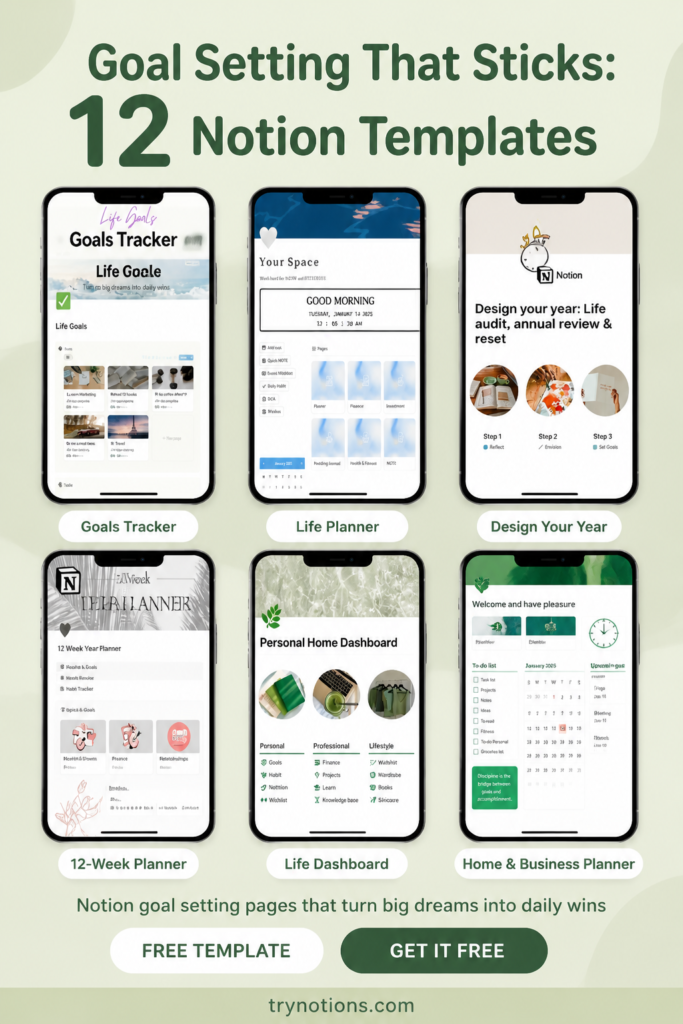
The collection below moves from broad life planning to narrower use cases. You will find all-in-one dashboards for personal goals, a yearly reset worksheet, a twelve-week planning system, student planners, a formula guide for building your own trackers, and business options for freelancers and designers. Every item is a digital Notion template. You duplicate it into your own workspace on a computer, phone, or iPad, then customize it. Use any template on its own, or combine sections from several.
1. Progress Bars for Big Life Goals
This option suits busy professionals and lifelong learners who want to turn large dreams into steps they can actually check off. Each goal gets a visual progress bar and a countdown, so you can see both how much you have finished and how much time remains. Subtasks link back to their parent goal, which makes the next action obvious. A goal to read four books, for example, can hold a separate deadline for each title. If you want a practical goal setting template for everyday life, this is a strong place to start.
Category metrics show progress percentages for areas such as health, finances, and career, which helps you spot imbalances early. Status options (Not Started, In Progress, and Done) keep the board honest, and you can add new goals or categories whenever your priorities shift.
Visual Countdown Goal Tracker
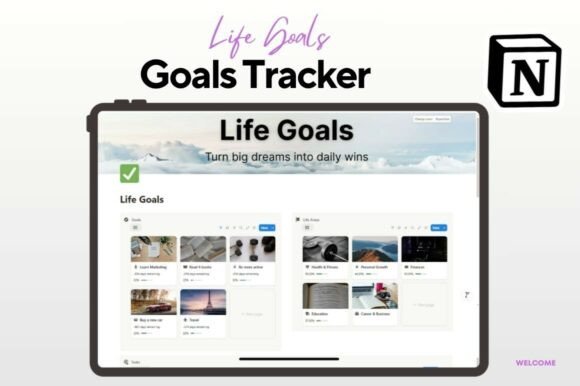
Break long-term dreams into steps you can actually check off. Visual progress bars, countdowns, linked subtasks, and category percentages for health, finances, and career keep each target visible and on schedule.
2. A Calm Second Brain for Your Goals
Choose this layout if you want one dashboard for goals, habits, money, reading, and daily life. The main page shows a goal tracker, an overview calendar, a habit tracker, and a daily quote for a little motivation. Linked sections for planning, finance, investment, health, notes, and lifestyle each open with a single click. The blue-toned interface feels calm, which helps when you need to focus on what matters most.
Blue-Toned Life Planning Dashboard
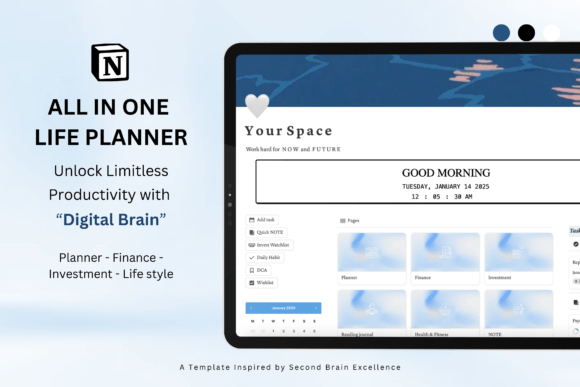
A calm, blue-toned planner that brings your goals, habits, daily quote, and monthly calendar onto one main page, with quick links to planning, finance, investing, reading, health, notes, and lifestyle sections.
3. A Yearly Reset Worksheet
If you prefer one big review each year, this worksheet guides you through three steps. Reflect asks you to assess well-being, career, relationships, and finances. Envision gives you room for a vision board, either digital or handmade. Set Goals applies the SMART method to turn that vision into milestones and progress checks, with a bucket-list area for bigger dreams. Think of it as a yearly goal setting worksheet with space for honest reflection.
It works well at the end of December or on the first weekend of January, though you can run it at any time that feels like a fresh start.
Three-Step Year-End Reflection Worksheet

A three-step annual review that moves from reflecting on the past year to envisioning what comes next, then turning your vision into milestones. It covers well-being, career, relationships, finances, and a bucket list.
4. Twelve Weeks Instead of Twelve Months
Most annual plans lose momentum by February. This system compresses a year of progress into twelve focused weeks, which makes deadlines feel close and real. It includes sections for mission and values, vision and goals, a daily planner, weekly plans, a tasks tracker, a brainstorm space, and a weekly review with overall results and next steps. A habit section and daily check-in page keep the routine going between reviews. Note that the template is available in English only.
Twelve-Week Results Planner Layout
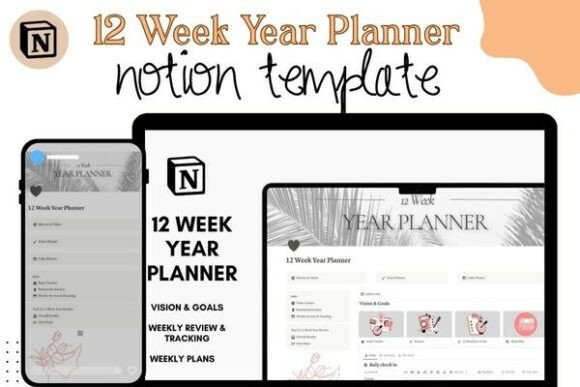
A twelve-week planning system that condenses a whole year of progress into focused cycles. Define your vision, set measurable targets, break them into weekly tasks, and track daily check-ins and habits along the way.
5. An Everyday Dashboard for Daily Life
This dashboard suits beginners who want goals to sit alongside everyday routines instead of inside a separate app. The home page combines a task list, a projects planner, a learning planner, a book tracker, and a finance tracker. A dedicated goal setting section lets you break aspirations into actionable steps and celebrate small wins along the way.
Extra pages cover meals, workouts, a Pomodoro timer, a watchlist, and a wishlist. Some people find that a lot. Delete any section you do not use, since that is exactly what a template is for. Check the product page for current pricing before you download.
Daily Life Command Panel

A daily dashboard that combines your task list, projects, learning, reading, and finances with meal planning, workouts, a Pomodoro timer, and a wishlist. Start with the sections you need and remove the rest.
6. Home and Business Goals in One Look
Creators and small business owners will appreciate the visual style here. It shows why a goal setting aesthetic matters: when a page looks pleasant, you are more likely to open it every day. The business side includes a goal to-do list, monthly highlights, marketing planners, an expense and income tracker, a CRM, and a content planner. The home side covers a to-do list, a daily habit tracker, and a cleaning schedule.
If you run a business from home, this layout keeps personal routines and professional goals in one calm space instead of spreading them across separate tools.
Cozy Home and Business Organizer

An aesthetic planner that covers home routines and business operations. Keep an eye on income, expenses, client meetings, content plans, and a cleaning schedule, all styled for a pleasant daily experience.
7. Study Sessions Linked to Study Goals
Students who want to connect long-term study targets with daily focus sessions will find this planner useful. A monthly calendar sits at the top, with a subject-of-the-day field, a study goal, a schedule, and an urgency box for deadlines that cannot wait. A mood bar and productivity level help you notice patterns over time, and a Pomodoro-style planner supports focused work blocks.
Change the colors and sections to suit your course load. If you only need a few parts, keep the calendar and urgency box and remove the rest.
Daily Study Focus Schedule

A daily study planner with a monthly calendar, mood bar, productivity level, subject tracker, study goal, and urgency box. A Pomodoro-style section helps you organize focused study blocks.
8. Formula-Driven Progress Tracking
Some people want to build their own tracker rather than copy someone else’s layout. This guide teaches Notion formulas step by step, from basic syntax and text functions to progress bars, countdown trackers, and habit and goal tracker formulas. Each lesson includes examples you can copy into your workspace, plus practice challenges and a cheat sheet.
It suits beginners who already understand databases and want to add automation. Expect to spend more time here than with a ready-made dashboard, but the payoff is a tracker shaped exactly to your needs.
Smart Formulas for Progress Tracking

A beginner-friendly guide to Notion formulas with step-by-step lessons on progress bars, countdowns, habit and budget trackers, and project status labels. Copy the examples and adapt them to your own databases.
9. Wheel of Life and SMART Goal Map
Coaches and self-guided users will like this minimalist worksheet. It opens with a Wheel of Life to rate your satisfaction across key areas, then moves into a SMART goal map that breaks each target into specific, measurable, attainable, relevant, and time-bound parts. Additional pages cover building habits, mindful choices, the procrastination killer, and the four quadrants for prioritizing tasks. It is one of the most structured goal setting worksheets in the collection.
The design uses light mode, minimal fonts, and a distraction-free writing space. Add as many custom sections as you need.
Minimal Life Coaching Workbook
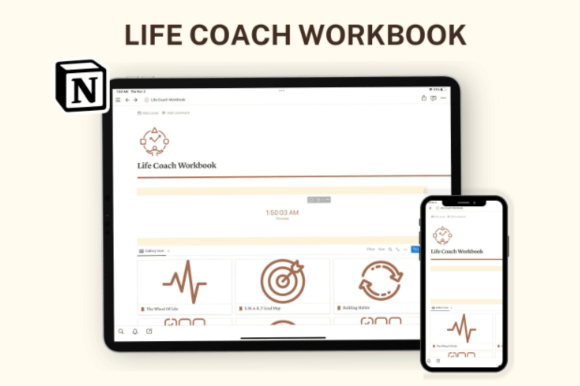
A minimalist workbook built around a Wheel of Life, a SMART goal map, habit-building pages, and prioritization tools. Clean fonts and light colors make it easy to focus on reflection and coaching notes.
10. Client Income and Goal Milestones
Freelancers need goals connected to clients, projects, and income. This system includes a My Goals section for milestones and daily habits, a time tracker with clock in and out, a financial insight page for invoices and taxes, and a clientele list to follow leads and project statuses. Profile, pricing, and document pages round out the setup.
This is a business-focused choice. If your goals are mostly personal, a general life planner will fit better. Beginners in freelancing will appreciate the step-by-step guidance on the support page.
Client, Income, and Goal Board

A freelance workspace for managing clients, active projects, calendars, task boards, time tracking, invoices, and pricing. Milestone goals sit beside daily habits, so business and personal progress stay connected.
11. Semester Goals and Exam Prep
Students who want goals tied to a semester, grades, and exams will find this planner useful. It starts with a Student Command Center for navigation, then moves into a course and semester planner, a weekly class schedule, and a smart task planner. Views such as Due Today and Due This Month help you focus on the next deadline.
The academic progress tracker monitors exam preparation and keeps a GPA dashboard updated for long-term planning. The layout is cozy, and no advanced Notion skills are required.
Student Semester Planner with Grades

A student planner that organizes your courses, weekly class schedule, assignments, and exam preparation in a cozy, easy-to-read dashboard. Track due dates and your GPA without juggling several apps.
12. Brand Projects with Milestone Goals
Freelance designers and startup founders often set goals around brand projects. This kit combines a freelance dashboard with goal setting, a design contract, a brand questionnaire, a project proposal, a strategy workbook, creative direction pages, a brand presentation, and brand guidelines. It shows how a personal goal can sit inside a larger client workflow, so every milestone connects to a real deliverable.
If you only need a goal setting tool for personal life, choose a lighter template. The kit makes more sense when your goals and client work overlap.
Complete Brand Identity Workflow Set

A complete branding toolkit covering client contracts, questionnaires, proposals, strategy workbooks, creative briefs, presentations, and brand guidelines. Each project stage stays linked to its goals and deadlines.
How to Get the Templates and Duplicate Them in Notion
Each template is sold through Creative Fabrica, and each product page lists its own price. Not every item is free. Creative Fabrica has offered free trial periods in the past, but offers change, so check the site for current terms before you sign up. Do not assume a trial covers every product.
You do not need a paid Notion plan to start. A free Notion account is enough to duplicate and use every template in this list. If you are looking for a free goal setting template for Notion, the setup steps stay the same for every option:
- Open the template link from its product page.
- Click Duplicate in the top-right corner of Notion.
- Customize the copy: rename sections, change colors, add your own goals, and delete anything you do not need.
Setting Goals Step by Step in Notion: A Goal Setting Worksheet You Can Copy
The five steps below work with any of the 12 templates. Think of them as a worksheet you can copy into any database or page. Each step is short, but skipping one usually causes trouble later.
Step 1: Write the Goal Clearly
Make the goal specific and measurable. “Read more” is a wish. “Read 12 books this year” is a target you can check. Put the statement in the title property of your goal database so it appears in every view. Goal setting begins with a sentence nobody could misread.
Step 2: Explain Your Reason
Write one sentence about why this goal matters to you. That sentence fuels you when the first week feels exciting and the third month feels dull. Store it in a text property next to the goal so you see it at every review.
Step 3: Break It into Milestones and Tasks
Split the goal into monthly milestones and weekly tasks. In Notion, link tasks to their goal with a relation property, or create subtasks under the goal page. A year of reading becomes four weekly sessions instead of a vague promise to read more.
Step 4: Set a Deadline and a Review Date
Add a deadline to the goal and a recurring review slot in your calendar or dashboard. A deadline without a review date is easy to ignore. Pick a fixed time, such as Sunday evening, and treat it like an appointment.
Step 5: Track Progress and Adjust
Update progress at least once a week. Use the progress bar, status label, or percentage formula in your template to see where you stand. If you miss a milestone, change the plan rather than just the target. Adjusting the path is normal. Quitting is the costly choice.
Goal Setting Ideas to Copy into Your Notion Workspace
If you are stuck on what to write, start with these examples. Use these goal setting ideas as a starting point, and keep the list short. A beginner who chooses one goal per area is more likely to stick with it than someone who tries ten at once. Here are eight examples across common life areas, with the template number that fits each one.
Health: walk 30 minutes, five days a week, for the next 90 days. Track it with the progress bars in template 1.
Finances: save a fixed amount each month and review it in the finance section of template 2.
Learning: finish one online course module every two weeks, logged in the learning planner from template 5.
Career: complete one certification unit by a set date, tracked on the business side of template 6.
Home: declutter one room each weekend, using the cleaning schedule in template 6.
Travel: save for one trip and book it by a fixed month, tracked in the lifestyle section of template 2.
Study: raise your average in one subject by a specific amount, tracked in template 7.
Creative: publish one piece of content each week, planned in the content planner from template 6.
For beginners, a useful rule is one main goal in each area and no more than three active goals overall.
Goal Setting Journal Routine: Daily and Weekly Check-Ins in Notion
A goal setting journal beats occasional planning because it creates a steady rhythm. A few lines each day keep your target in view, and a weekly review shows whether the plan still fits your life. You do not need pages of reflection. Two minutes a day and twenty minutes a week are enough for most people.
The daily check-in covers three prompts: What moved forward today? What blocked me? What is the next smallest step? Record the answers in a simple toggle page or database entry, and update one progress property. The weekly review is a longer session. Look at every active goal, mark it on track, at risk, or paused, and choose the top three tasks for the coming week.
Templates 4 and 5 both include daily check-in pages, so they suit this routine well. If your template lacks them, add a recurring page of your own.
Notion vs Paper Planner vs Other Apps: Choosing Your Goal Setting Aesthetic
Your tool matters less than whether you actually use it. Here is how the main options compare.
Notion for Goals: Strengths
Notion connects goals, tasks, notes, and finances in one workspace. Linked databases, dashboard views, and progress formulas update automatically, and the same workspace syncs across your devices.
Paper Planner: Strengths and Limits
A paper planner is tactile and free from notifications, which some people find calming. It is harder to update, search, or automate, so progress tracking can slip when life gets busy.
Other Apps: When They Fit Better
Single-purpose habit trackers and task apps can be simpler if you only need one thing. Notion works best when you want your goal setting connected to notes, projects, and money, or when you enjoy building your own system.
Choosing the Right Goal Setting Aesthetic
A pleasing layout increases daily use. Pick colors, fonts, and icons you actually enjoy, and keep the design minimal enough that you can read a page in seconds. Templates 2 and 6 show how a consistent palette makes a page feel inviting. The best goal setting aesthetic is the one that makes you open the page without thinking about it.
Using Your Goal Setting Pages on Phone and iPad
Notion syncs across computer, phone, and iPad, so you can update a goal from anywhere. A quick check on the bus or a progress update before bed takes far less time than opening a laptop.
A few habits make mobile use easier. Pin your main dashboard to your home screen, use quick-add shortcuts where available, and keep updates to a few taps: change a status, tick a task, or add a short note.
Wide databases and complex formulas can be hard to read on a small screen. Create a simpler mobile view with fewer columns, or switch to a list or gallery view for quick reading. Your goal setting system should be easy to use on the device you carry most often.
Common Goal Setting Mistakes and How to Avoid Them
Most failed plans follow the same few patterns. Watch for these five mistakes.
Too many goals at once. Limit yourself to one to three main goals, and attach a small habit to each one.
Vague wording. Replace “be healthier” with a measurable, time-bound statement such as “walk 30 minutes, five days a week, until June.”
No review schedule. A goal that is never reviewed becomes invisible. Book a recurring weekly check-in.
Over-designing the template. Spend your energy on the plan, not on perfect colors and icons. You can refine the look later.
Ignoring the why. A goal without a reason fades quickly. Write one sentence about why it matters.
Fixing these mistakes is most of the work of good goal setting.
Frequently Asked Questions About Goal Setting
What is goal setting, in simple terms?
Goal setting means deciding what you want to achieve, why it matters, and the concrete steps you will take to reach it. It turns a wish into a plan you can check.
How many goals should a beginner set?
Start with one to three main goals at a time, plus a few supporting habits. Fewer goals usually means more progress on each one.
What is the difference between a goal and a habit?
A goal is an outcome you aim for, such as finishing a course. A habit is a repeated action that moves you toward it, such as studying for 20 minutes each day.
Do I need the SMART method for setting goals?
No, but it helps. SMART is a checklist that makes goals specific, measurable, achievable, relevant, and time-bound. Use it whenever a goal feels vague.
Can I use a goal setting template without advanced Notion skills?
Yes. Most templates in this list can be duplicated and customized with basic editing. Formula-based trackers take more time, so start with a simpler layout if Notion is new to you.
Is there a free way to try these templates?
Creative Fabrica has offered free trial periods in the past, but terms can change and not every template is free. Check the site for current details and the price on each product page.
How often should I review my goals?
Check progress briefly each day and do a full review once a week. Go deeper every month or quarter to decide whether your goals still match your life.
Wrapping Things Up
Good goal setting comes down to five habits: a clear target, a real reason, milestones, a firm deadline, and regular review. None of them require expensive software or advanced skills. Your Notion workspace simply gives those habits a home.
Choose one template from this list and one goal for this week. Duplicate it, add your first milestone, and book your first review. The best system is the one you open every day, so start small and let it grow with you.
Progress is rarely dramatic. It shows up as a checked box, a moved progress bar, or a short note on a Tuesday evening. Keep those small wins visible, and your goals will feel closer every week.
Worth Checking Out
Ditch the Spreadsheet Stress: How Notion Templates Can Make You a Money Master