A blank page and a folder full of scattered notes can slow down any long writing project, especially a novel with dozens of chapters, characters, and research files. A notion writing template solves that problem by placing your outline, characters, drafts, and word-count goals in one connected workspace.

This guide explains what a notion writing template is, why writers benefit from one, and how to set it up step by step. You will also see 12 picks grouped by use case, from novel planning to goal tracking and copywriting. Because many authors also run blogs, newsletters, or sales pages, a few picks lean toward content creation.
Notion for Writers: What a Notion Writing Template Includes
A notion writing template is a pre-built workspace made of pages, databases, and views. You duplicate it into your own account, which is free to start, and replace the sample text with your own book.
Writers benefit most when everything sits in one searchable system instead of across folders, documents, and apps. Many people who try writing notion for the first time are surprised by how quickly the pieces connect, since outlines, drafts, and research can link to each other.
Good structure in any notion writing template separates planning from drafting. Outlines, character notes, and research stay apart from chapter pages and daily word counts, so you can switch between thinking and writing without losing context. A solid setup usually includes:
- A home dashboard with today’s focus and progress.
- A manuscript section with chapter or scene pages.
- Character and location databases with linked notes.
- A research vault and a tracker for word counts.
Novelists, screenwriters, bloggers, and copywriters who juggle several projects all benefit from this structure. If you are searching for notion for writers that actually fits a busy schedule, start with this layout.
12 Notion Template Ideas for Writers, Grouped by Use Case
The picks below are grouped by goal: novel writing, life and goal organizing, and copywriting or marketing. Each entry lists its best use case and key contents, so you can match a notion writing template to your project rather than duplicating everything. Some products are built for ads or student planning, and they are included because many writers also write emails, sales pages, or coursework. If you want more notion template ideas for writers after reading, this list is a good place to begin.
All-in-One Manuscript Workspace for Novelists
This is the strongest notion writing template in the list for a complete book. Its pre-writing area includes a brain dump and task pages, a three-act outline with short and long versions, and manuscript and scene cards. Setting pages cover world-building and a magic system, while a styles page and a reference vault keep your notes sorted.
Minimal Chic Manuscript Planner

A distraction-free writing workspace with minimalist fonts and colors. Every section is fully customizable, so you can add new parts as your project grows. It includes task lists, a pre-writing area, a three-act outline, scene cards, world-building pages, a styles page, and a reference vault.
Chapter and Word Count Tracking for Fiction Authors
Built for fiction authors who want to see progress at a glance. This is a notion writing template built around momentum: chapter and plot pages sit beside character profiles and a writing progress tracker with daily word-count goals. A research board, a world-building toolkit, and a playlist page round out the setup for focused sessions.
Chapter Planning Word Count Tracker

A novel planning setup that organizes chapters, plot structure, and character arcs. The writing progress tracker sets daily word-count goals, while a research board keeps references and images in one place. A world-building toolkit and a playlist page help create a focused atmosphere.
A Creative Studio for Writers Who Experiment
A good fit for creators who write across several areas, such as fiction, marketing, and AI experiments. The idea log captures sparks before they fade, the creative writing studio holds drafts and inspiration, and the keyword library and social media command center keep promotion organized. If your projects are mixed, this notion writing template keeps them together on one dashboard.
Creator Studio Idea Dashboard
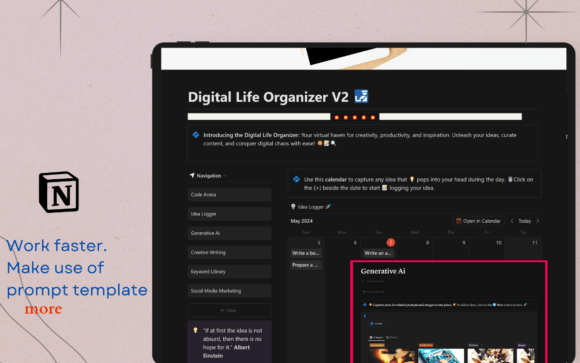
An all-in-one creator workspace with an idea log for quick sparks and a writing studio for drafts. A keyword library supports search-friendly content, and a social media command center helps plan posts. Dedicated sections cover coding practice and AI experiments for people with mixed projects.
Goal Setting and Habit Planning Workbook
Helpful for writers who want goals and routines organized next to their writing practice. The workbook includes a Wheel of Life, a SMART goal map, habit-building pages, a procrastination section, and a four-quadrant priority matrix. Color-coordinated pages and task lists keep the layout calm and easy to scan.
Life Balance Goal Planner

A minimalist workbook for organizing coaching sessions and personal goals. It includes a Wheel of Life, a SMART goal map, habit-building and decision pages, a procrastination section, and a four-quadrant matrix. Everything is fully customizable, with a color-coordinated layout.
A Task System Built on the GTD Method
Built on Getting Things Done, this system captures ideas, tasks, and projects in one place. Dedicated sections for Inbox, Next Actions, Projects, Waiting For, Someday/Maybe, and Reference help you sort what matters from what can wait. Writers often use it to turn a book’s milestones into a weekly task list, so the novel keeps moving even in busy weeks. It pairs well with a notion writing template for drafting.
Inbox Clear Productivity System
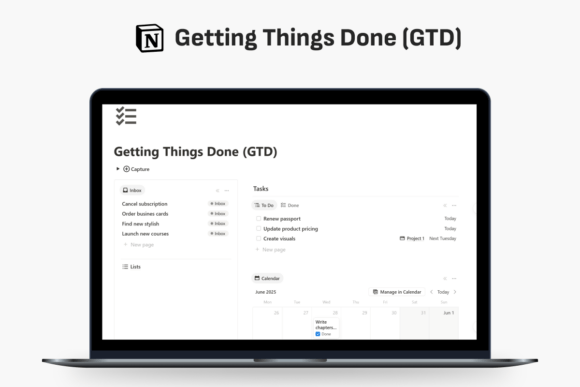
Built on the Getting Things Done method, this template captures every idea, task, and project in one easy-to-use system. Dedicated sections for Inbox, Next Actions, Projects, Waiting For, Someday/Maybe, and Reference keep daily work organized. Simple setup, with no extra apps required.
Coursework Deadline Tracker for Students
This pick is aimed at students rather than novelists, but it suits writers balancing classes or thesis deadlines. Track each assignment, its due date, and its completion status in a single list. A digital Notion version is included for people who prefer to plan on a device, so it fits how you already work.
Student Deadline Planning Tool

A tracker for coursework and deadlines, with a digital Notion version for people who prefer digital tools. Keep assignments, due dates, and study schedules in one place, and see what is still open at a glance.
SEO Checklists for Etsy Listing Copy
Aimed at Etsy sellers who write titles, tags, and descriptions for listings. An SEO checklist and a database for storing strong keywords keep your copy consistent. A trademark database helps you check names before publishing, and ChatGPT prompt pages speed up drafting. It is a niche fit for writers who sell handmade or digital goods.
Listing Keyword Tracker
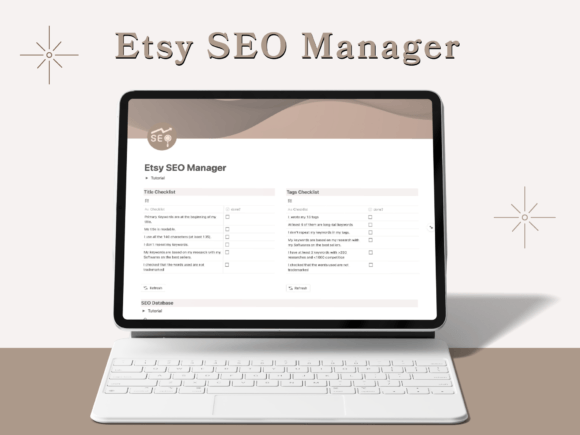
A workspace for sellers who write listing titles, tags, and descriptions. It includes an SEO checklist, a database for tracking your best keywords, a trademark table to avoid name conflicts, and ChatGPT prompt pages for drafting listing copy. Designed for personal use.
Ready-Made Ad Copy Prompts for Campaigns
Marketers and freelancers who need fast ad ideas will get the most from this collection. It includes more than 100 prompts with proven structures for Facebook, Instagram, TikTok, and Google, plus lines for every stage of the funnel. Copy them into a campaign page and use them from a phone, tablet, or laptop. The next two picks overlap heavily with this one, so compare them before choosing.
Ready Ad Copy Swipe File

A swipe file of more than 100 ad prompts for marketers and freelancers who need fast ideas. Prompts are designed to hook attention, spark emotion, and push action across platforms and funnel stages. Copy them into a campaign workspace and use them from any device.
Starter Prompt Collection for Marketers
A lighter option built on the same prompt structure as the collection above. It is useful for testing the format before committing to a larger pack, and for quick brainstorming on a phone or laptop. Because the content overlaps with the previous pick, choose based on how much you plan to use the prompts.
Beginner Friendly Prompt Starter
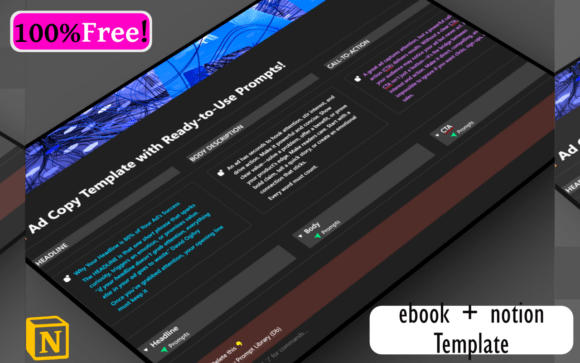
A starter version of ad copy prompts for digital marketers, using the same structure of proven prompts for hooks, emotion, and calls to action. It suits marketers who want to test the format before choosing a larger collection, and works on phone, tablet, or laptop.
Headline Swipe File With 50 Formulas
Useful for bloggers, email writers, and creators who need headlines that get clicks. The system sorts more than 50 formulas by strategy and purpose, so you can plug in your own topic. A usage tracker records where each headline was used, and a favorites filter brings back your best performers. Think of it as a notion writing template for headlines, with no coding required.
Headline Ideas Usage Tracker
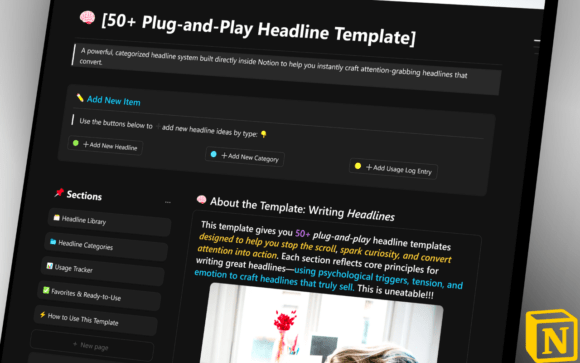
A headline system with more than 50 formulas sorted by strategy and purpose. Add your own headline to any template, log where you used it, and filter your favorites for quick reuse. It works for blog titles, email subject lines, and social posts.
Copywriting Framework Toolkit for Campaigns
Ideal for copywriters and business owners who write persuasive ads. Pre-built frameworks such as AIDA, PAS, BAB, and the 4Ps give your draft a structure, while prompt sections for hook, body, and call to action guide the writing. A campaign dashboard with objective tags, such as awareness or conversion, keeps several campaigns in view.
Campaign Copywriting Frameworks Dashboard
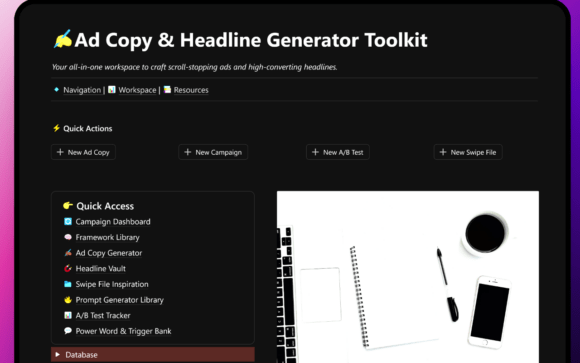
A structured workspace for building persuasive ads. It includes pre-built frameworks such as AIDA, PAS, BAB, and the 4Ps, prompt sections for hook, body, and call to action, a drafting space, and campaign tags for awareness or conversion. Built for marketers, creators, and affiliates.
Step-by-Step Ad Writing Guide
Designed for entrepreneurs and digital marketers who want guidance from a blank page to a finished ad. Cheat sheets of proven prompts help you produce persuasive lines quickly, and the step-by-step layout suits people with little copywriting experience. It is ready to duplicate and use right away.
Winning Campaign Copy Helper

A step-by-step template that guides you through writing high-converting ads without guesswork. Cheat sheets of proven prompts help you produce persuasive copy quickly, and it suits digital marketers, entrepreneurs, and creators. Ready to duplicate and use right away.
Getting a Writer Notion Template Into Your Workspace
Creative Fabrica currently offers one month of free access on its current terms. Treat that as a time-limited trial rather than a permanent free plan, and check each listing’s price and terms on the day you buy. Some products may be free while others are paid.
A free Notion account is enough to duplicate a notion writing template and use most picks in this list. The process is quick, and you can use these steps for any template above:
- Open the product link.
- Click the Notion share link on the product page or file.
- Click Duplicate to copy the template into your own workspace.
- Rename the template, delete sections you do not need, and add your own projects.
Duplicate into a dedicated Writing teamspace so your work is easy to locate later.
Step-by-Step: Notion Novel Writing Template Setup
This 30 to 45 minute setup works with most picks in the list above. Start with the dashboard, then add a chapter database, character pages, and a word-count tracker. You can apply these steps to any notion novel writing template you choose.
Step 1: Build Your Book Home Page
Link your outline, characters, chapters, and tracker from one dashboard page. Add a short current focus line and update it each week so you always know what comes next.
Step 2: Create a Chapter or Scene Database
Create a database with properties such as status (idea, drafting, revised, final), word count, point of view, and date. Add a board view to move chapters across stages, and a table view for quick edits.
Step 3: Set Up Character and World-Building Pages
Build one database for characters with fields for role, goal, flaw, and arc. Keep locations, world rules, and timelines on separate pages, linked to the chapters where they appear.
Step 4: Add a Word Count Tracker
Create a table or database for daily word counts with date, words written, and running total. Add a simple chart or table view to see your weekly total at a glance, and connect the tracker to your home page.
Writing Notion Setup: Build a Dashboard You Will Actually Use
A notion writing dashboard works best when it answers three questions: What am I writing today? Where am I in the book? How much have I written this week? Each answer should be visible within a few seconds of opening the page.
Before building your first notion writing template dashboard, decide which views matter most. Use linked database views for today’s tasks, chapter status, and a word-count chart. Keep the dashboard to five to seven sections so it stays readable, and add a Next Session block at the top so you can start writing within a minute.
Notion Story Writing Template vs Notebook Planning
Notebooks work well for freewriting and a daily ritual. A notion story writing template is stronger when chapters, characters, and research need to link together and stay searchable across the whole project.
Other apps have their own strengths. Scrivener handles long-form compilation, and Google Docs is simple for shared drafts. Notion sits between them as a planning space, and many writers use it for outlines and tracking while drafting in a dedicated editor.
Choose a notebook for a daily ritual, a notion writing template for a structured multi-project workspace, and a dedicated editor for final formatting.
Using a Notion Book Writing Template on Phone and iPad
Notion works across phone, tablet, and computer, and the same page syncs between them. A notion writing template works just as well on the go, so you can capture ideas, log word counts, and review chapters while commuting.
On iPad, the larger layout suits outlines and board views. Keyboard shortcuts help during long sessions, and a home screen shortcut opens your dashboard in one tap.
Before traveling, check that the pages in your notion book writing template are available offline, so your outline and chapter list stay with you.
Notion Template Ideas Writing for Blogs, Newsletters, and Scripts
Beyond the novel, the same building blocks work for other writing projects. These ideas are common starting points:
- Blog and content calendar: a database of post ideas with status, publish date, and target keyword.
- Newsletter tracker: issues, subscriber goals, and a headline swipe file.
- Screenplay or scene planner: scene cards, act structure, and character arcs.
- Research vault: clipped articles, quotes, and sources with tags.
- Copywriting library: prompts organized by platform and funnel stage.
A writer notion template for a blog can start as a simple calendar and grow with new views as your output increases.
Common Mistakes When Using Notion for Writing
- Over-building: start with three to five sections and add more only when you need them.
- Setup overload: set a 45-minute limit for the initial build so setup does not replace writing.
- Skipping reviews: schedule a 15-minute weekly review to update status and word counts.
- Duplicating without customizing: rename properties and delete unused sections to fit your project.
- Too many tools: keep planning in Notion and drafting in one editor.
Most of these problems come from treating a template as finished. A notion for writing system works best when it changes with your project.
Frequently Asked Questions About Notion Writing Templates
Is a notion writing template free to use?
Notion offers a free plan that covers most personal writing setups. Template pricing depends on the seller, so check each listing and Creative Fabrica’s current offer before you start.
Do I need a paid Notion plan?
A free Notion account is enough for most templates in this list. Check each product page for any specific requirements.
Which notion writing template should I choose for a first novel?
For a complete manuscript workspace, start with the all-in-one manuscript option. If word-count goals matter most, the chapter tracking pick is a better match.
How do I track word count in Notion?
Create a database with date, words written, and total fields, or use a notion writing template that already includes one. Then add a table or chart view to see your weekly progress.
Can I use these templates on my phone and iPad?
Yes. Notion syncs across phone, tablet, and computer, and the mobile app supports most views.
Are these templates only for novelists?
No. Several picks cover blogging, copywriting, goal setting, and study planning, so choose by use case rather than by the word writer.
How do I duplicate a template into my own workspace?
Open the product link, click Duplicate, rename the copy, and customize the sections to fit your book.
Final Takeaways
A notion writing template turns scattered notes into one organized system, with your outline, characters, research, and word counts all connected. The best pick depends on your goal. Choose the manuscript workspace for a full novel, the tracker for daily progress, or the copy toolkits if your writing supports sales pages and ads. Give the setup 30 to 45 minutes, keep it simple at first, and customize as your project grows. Writers who keep planning and drafting in separate spaces tend to stay consistent longer. Duplicate one template this week, then write the first chapter inside your new dashboard.
Worth Checking Out
Feel in Control Again: 18 Notion Workspace Templates for Work

